
No products in the cart.
Return To ShopHow to Fix Lines on iPhone Screen: A Complete Troubleshooting Guide
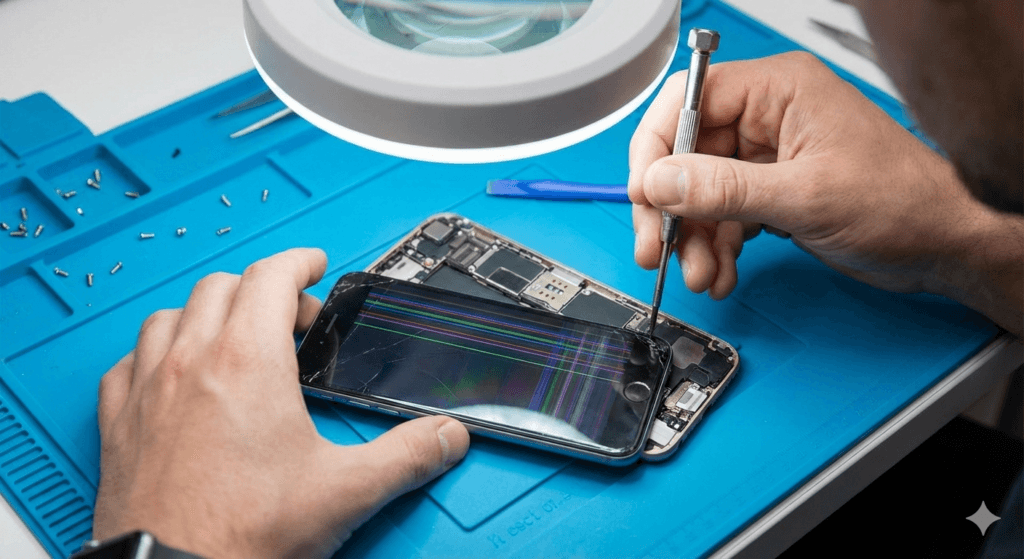
If you’re seeing lines on your iPhone screen, whether they are horizontal, vertical, or diagonal, it can be frustrating. These lines might appear due to software glitches, physical damage, or even a hardware malfunction. In this guide, we’ll walk you through the steps to troubleshoot and fix lines on your iPhone screen, helping you restore your device to its normal state.
Step 1: Check for Software Issues
Before jumping to conclusions, it’s important to rule out software-related problems. Sometimes, a simple software issue can cause strange lines to appear on the screen. Here’s how you can troubleshoot:
Restart Your iPhone
- Hold down the power button and swipe to turn off your iPhone.
- Turn it back on after a few seconds.
Restarting can resolve minor software glitches that may be causing the lines on your screen.
Update iOS
- Go to Settings > General > Software Update.
- If an update is available, install it.
Updating to the latest version of iOS can fix bugs and improve your iPhone’s performance.
Reset Settings
If restarting or updating doesn’t work, try resetting your iPhone settings:
- Go to Settings > General > Reset.
- Select Reset All Settings (Note: This will not delete your data, but it will reset system settings such as Wi-Fi passwords).
Step 2: Test for Hardware Problems
If the lines on your iPhone screen remain after a software fix, it might be a hardware issue. Here are the common causes of hardware-related screen lines:
Physical Damage
If your iPhone has been dropped or exposed to pressure, the screen’s connection to the internal components may be disrupted, causing lines to appear.
Screen Malfunction
If your screen is damaged, it can lead to issues like dead pixels or faulty display connections. In this case, your iPhone might require professional attention.
Step 3: Try to Fix the Problem Yourself
If you’re comfortable with DIY solutions, you can attempt to fix the issue before contacting a professional repair service. However, be careful not to cause further damage.
Clean Your Screen
Dirt, debris, or moisture between the screen and glass can sometimes cause lines. Clean your iPhone screen with a microfiber cloth to remove any particles.
Try a Hard Reset
A hard reset can help resolve some display issues:
- For iPhone 8 or newer, quickly press and release the volume up button, then the volume down button, and press and hold the side button until the Apple logo appears.
- For older iPhones, press and hold the Home and Power buttons until the Apple logo appears.
Step 4: Professional iPhone Screen Repair
If none of these methods work, it’s time to seek help from a professional. A damaged iPhone screen can be repaired by experts who can replace faulty parts or perform a more in-depth diagnostic. For those in areas like Orlando, finding reliable services for iPhone screen repair in Orlando is an easy option, and technicians can provide a thorough assessment. If you’re uncertain, a certified repair center can be a great resource for getting your device back to working condition.

1. Why are there vertical lines on my iPhone screen?
Vertical lines on your iPhone screen can be caused by a software glitch, a physical drop, or a malfunctioning display. Start by restarting your device or updating your software. If the issue persists, it might be time for a screen replacement.
2. How do I know if my iPhone screen is damaged?
Signs of screen damage include lines, dead pixels, discoloration, and unresponsiveness. If your screen shows any of these symptoms after a drop, it’s likely that the screen has suffered physical damage and needs repair.
3. Can I fix the lines on my iPhone screen myself?
If the issue is software-related, restarting, updating iOS, or resetting settings might fix the problem. However, if it’s a hardware issue, it’s best to seek professional repair services, especially if your screen is cracked or damaged.
4. How much does it cost to fix an iPhone screen in Orlando?
The cost of fixing an iPhone screen in Orlando depends on the model of your iPhone and the extent of the damage. On average, screen repair can range from $100 to $300, but prices may vary depending on the service provider.


About author

Related posts

Cracking your phone screen is stressful, and the first moments after it happens are crucial. Taking the right steps immediately can prevent further damage, save... Continue reading

Living in Orlando, you’re no stranger to the rainy season’s sudden downpours and high humidity. Whether you’re caught in a storm near Lake Eola or... Continue reading
Add comment