
Why Small Cracks Lead to Big Problems: Tips From a Trusted Phone Screen Repair Store in Orlando, FL
A small crack on your phone screen may seem harmless—something you can “deal with later.” But those tiny fractures often turn into major headaches faster than you expect. As any trusted phone screen repair store will tell you, delaying the repair can lead to bigger issues that cost more time, money, and sometimes even your data.
Below, we’ll break down why small cracks matter, what problems they cause, and how to prevent long-term damage.
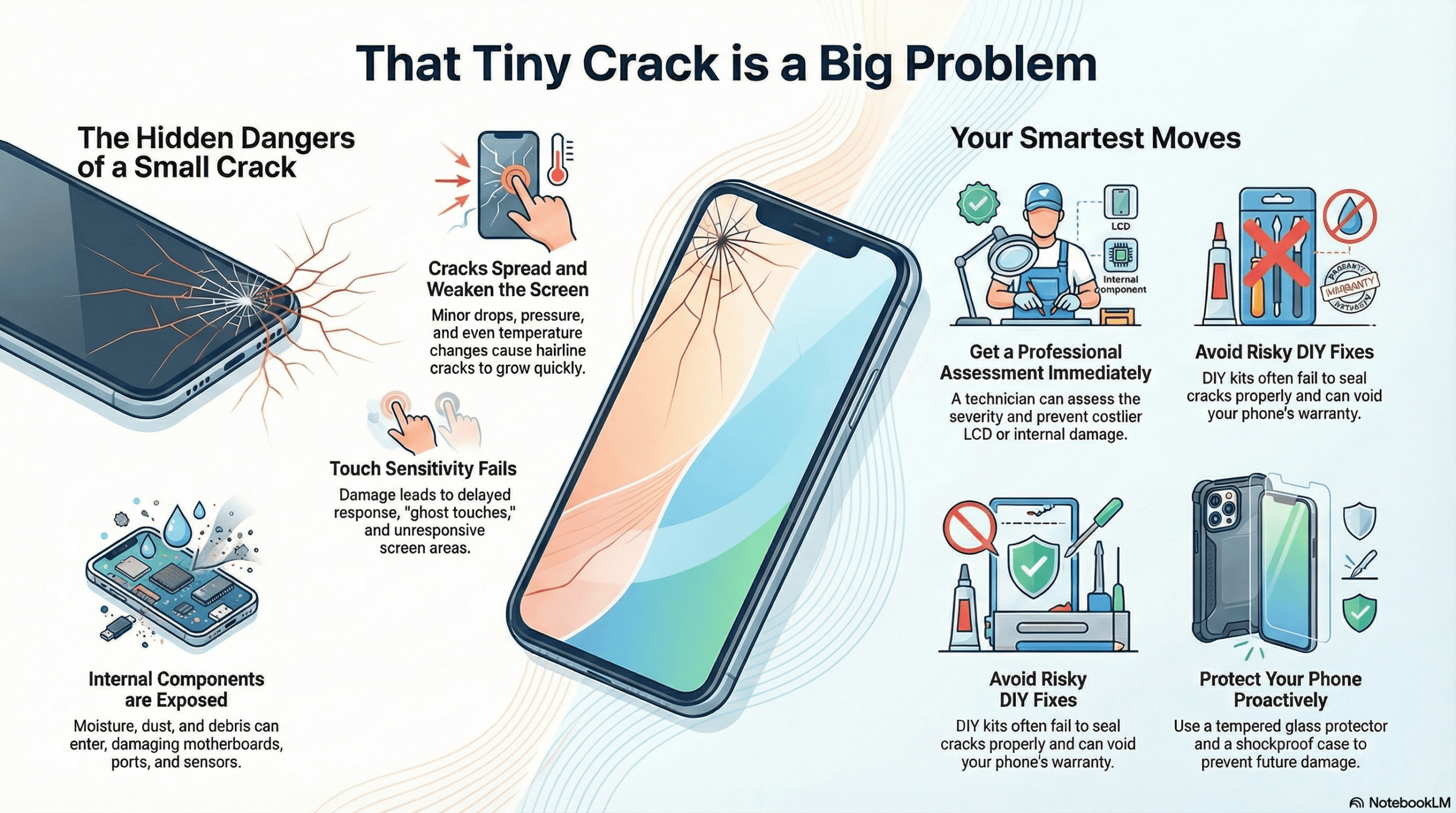
Why Small Cracks Are More Dangerous Than You Think
1. Cracks Spread Faster Than You Notice
- Even a hairline crack can widen with:
- Temperature changes
- Accidental pressure in pockets or bags
- Minor drops
- Once the crack grows, the entire screen structure becomes weaker.
2. Touch Sensitivity Starts to Fail
A cracked screen doesn’t only affect looks—it affects functionality. Common issues include:
- Delayed touch response
- Random ghost touches
- Unresponsive areas on the screen
A reliable phone screen repair store Orlando, FL sees this in early-stage cracks almost daily.
3. Dirt, Moisture, and Dust Enter the Phone
Tiny openings in your cracked screen act like doorways for:
- Moisture
- Dust
- Debris This can damage the internal components, including:
- Display connectors
- Charging ports
- Motherboards
If moisture reaches these parts, repair becomes more expensive and complicated.
4. LCD Damage Gets Worse
A crack on the outer glass may eventually reach the LCD. When this happens, you’ll notice:
- Green or purple lines
- Black spots
- Flickering
- Full screen blackout
Once the LCD is damaged, simple screen repair becomes a full display replacement.
What You Should Do When You Spot a Crack
1. Avoid Pressing on the Cracked Area
Avoid unnecessary pressure on the damaged screen. This prevents additional spreading.
2. Don’t Try DIY Fixes
DIY kits usually:
- Don’t seal the crack properly
- Damage the internal components
- Void warranties
A professional repair is always safer and more reliable.
3. Backup Your Data
If your screen is getting worse, back up your data right away. Cracked screens can suddenly stop working after one drop.
4. Get a Professional Assessment
Visiting a local repair technician will help you:
- Understand the severity
- Get repair options
- Prevent LCD or internal damage
Tips to Prevent Cracks From Turning Serious
- Use a premium tempered glass protector – Cheap ones don’t absorb impact properly.
- Invest in a shockproof case – Especially if you drop your phone often.
- Avoid placing your phone in back pockets – Accidental pressure causes spreading cracks.
- Keep your device away from heat – Heat expands cracks quickly.
These small habits help extend the life of your smartphone and avoid expensive repairs.
When Should You Replace a Cracked Screen?
Replace your screen immediately if you notice:
- Touch lag
- Lines or spots
- Brightness flickering
- Sharp edges where glass is lifting
- Moisture seeping inside
Waiting too long often turns a simple fix into a costly repair.
Conclusion
Small cracks are not just cosmetic—they’re warning signs. The sooner you address them, the more money and stress you save. A reliable phone screen repair store Orlando, FL can help you prevent deeper damage and restore your phone’s performance quickly. Don’t wait until the crack becomes a major issue.




Add comment